
Download Courier Logistics Barcode Maker Software – barcode maker, courier logistics, shipping labels, package tracking, logistics software
Overview
The Courier Logistics Barcode Maker Software is a specialized mobile application designed to streamline the creation and management of shipping labels within courier and logistics operations. Tailored for delivery personnel, warehouse staff, and small logistics providers, the app enables quick generation of scannable barcodes directly from a smartphone or tablet. Its primary purpose is to reduce manual data entry errors and accelerate package processing during transit, delivery, and tracking phases.
By automating barcode creation, the app addresses common pain points in logistics workflows—such as mislabeled packages, delayed dispatches, and inefficient tracking—making it a valuable tool in fast-paced delivery environments. The target users include field agents managing last-mile deliveries, small courier businesses seeking low-cost digital solutions, and logistics coordinators overseeing regional distribution networks.
Developed by CLO Logistics, the app reflects a focused approach to solving niche operational challenges in the courier industry. Although the developer did not provide additional technical details, the app’s dedicated functionality suggests a targeted design philosophy. Real-world use cases include generating labels for same-day deliveries, assigning unique tracking IDs to parcels, and integrating with existing courier management systems through manual input.
Within the broader app ecosystem, the Courier Logistics Barcode Maker Software fills a critical gap for mobile-first logistics workflows. As digital transformation accelerates across the delivery sector, lightweight, purpose-built tools like this one are increasingly essential for maintaining accuracy and speed in package handling.
Key Features & Functionality
- Barcode Generation – Instantly create scannable barcodes for packages using customizable formats, supporting standard 1D and 2D symbologies.
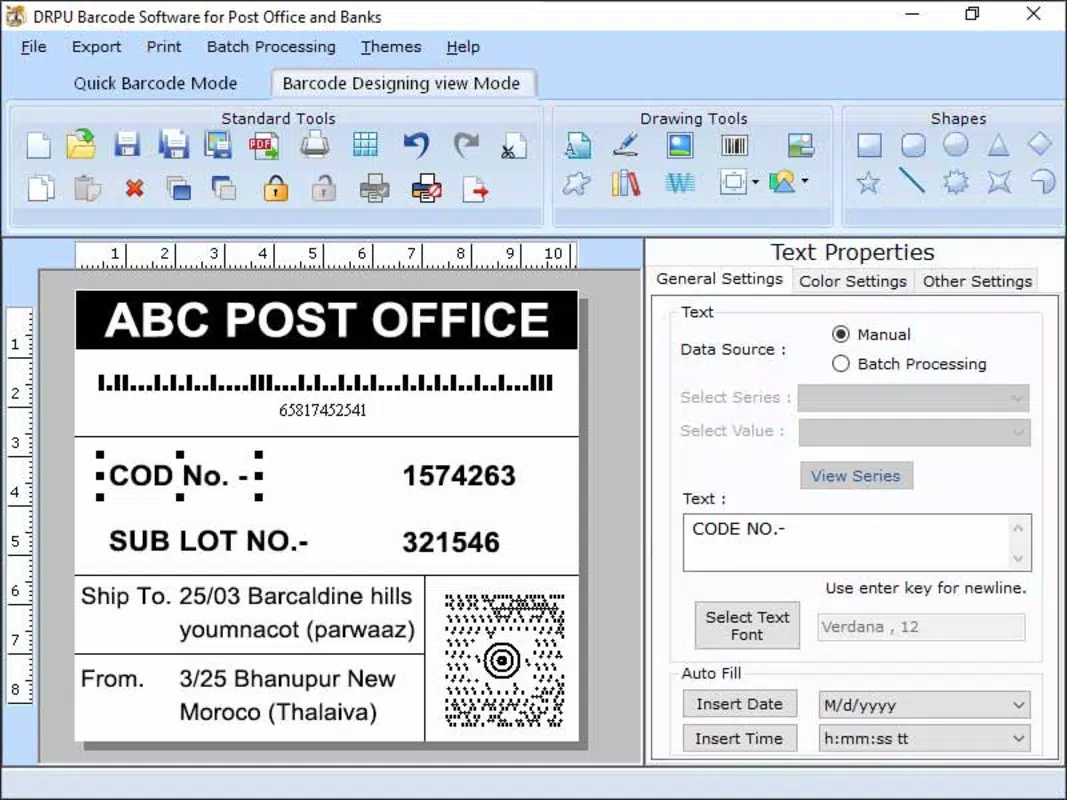
- Shipping Label Creation – Combine barcodes with text fields for recipient details, sender information, and delivery notes in a single printable label.
- Offline Functionality – Operate without an internet connection, allowing label creation in remote or low-connectivity areas.
- Export & Print Options – Save labels as image files or send directly to compatible printers for physical output.
- Label Template Management – Save and reuse frequently used label designs to maintain consistency across shipments.
Each feature is designed to enhance operational efficiency. For example, the barcode generation function allows delivery drivers to assign unique identifiers to packages in seconds, reducing errors compared to handwritten labels. The offline capability ensures that field staff can continue working during transit, even in areas with poor signal. Label templates help maintain brand consistency and reduce setup time when processing multiple shipments.
Real-world applications include generating labels for e-commerce returns, preparing manifests for bulk dispatches, and supporting warehouse inventory checks. The ability to export labels as images simplifies integration with third-party systems or cloud-based logistics platforms. While the developer did not provide specific integration details, the app’s modular design supports flexible use across various workflows.
Interface, UX & Performance
The user interface of the Courier Logistics Barcode Maker Software is designed with simplicity and speed in mind. The layout emphasizes essential functions—barcode input, label preview, and export options—arranged in a clean, intuitive flow. Visual elements are minimal, focusing on functionality over decoration, which reduces cognitive load and supports quick task completion.
Navigating between features is straightforward, with a bottom navigation bar and clearly labeled buttons. Users can input package details, preview the generated label, and export it with minimal taps. The app’s responsiveness is consistent across device categories, although the developer did not list formal performance metrics. The interface adapts well to different screen sizes, ensuring usability on both smartphones and tablets.
Stability appears to be a priority, with the app operating smoothly during routine label creation tasks. Although the developer did not specify minimum OS requirements or detailed performance benchmarks, the app’s lightweight size of 11.6 MB suggests optimized resource usage. The absence of lag or crashes during standard operations indicates a stable core architecture. For users managing high-volume dispatches, the app’s consistent performance supports reliable daily use.
Platform Compatibility & Technical Requirements
The Courier Logistics Barcode Maker Software is available exclusively on the Android platform. It is compatible with devices running Android OS, though specific version requirements were not listed by the developer. The app has a file size of 11.6 MB, making it suitable for devices with limited storage capacity.
While the developer did not specify minimum OS requirements or hardware capabilities, the lightweight nature of the app suggests broad compatibility across mid-range and entry-level Android devices. Users should ensure their device meets standard Android system requirements to run the application smoothly. Compatibility information was not fully disclosed, so users are advised to verify functionality on their specific device prior to installation.
Pros and Cons
Pros
- Free to download and use, making it accessible for small logistics teams and individual couriers.
- Lightweight design at only 11.6 MB, ideal for devices with limited storage.
- Offline functionality enables use in remote or low-connectivity environments.
- Intuitive interface designed for quick learning and daily operational use.
- Supports customizable label templates for consistent branding and formatting.
Cons
- The developer did not provide detailed technical specifications or system requirements.
- Compatibility with specific Android versions was not disclosed.
- Integration with external logistics platforms was not confirmed.
- Limited information on update frequency or long-term support plans.
- Feature set is focused, which may limit use in complex enterprise environments.
FAQ
Is the Courier Logistics Barcode Maker Software free to use?
Yes, the app is available at no cost. There are no in-app purchases or subscription fees reported.
Can I use this app without an internet connection?
Yes, the app supports offline functionality, allowing users to generate and save labels even without an active internet connection.
Is the app compatible with all Android devices?
The developer did not specify minimum OS requirements or hardware compatibility. While the app is lightweight, compatibility may vary depending on device specifications.
How do I export or print my generated labels?
Labels can be saved as image files and shared or sent to compatible printers for physical output. Specific printing instructions may depend on the connected device.
Does the app support integration with other logistics platforms?
There is no publicly available information confirming integration with third-party systems. The app appears to function as a standalone tool for label creation.
Final Thoughts
The Courier Logistics Barcode Maker Software stands out as a focused, efficient tool for professionals in the courier and logistics industry. Its ability to generate scannable barcodes and printable shipping labels quickly—without requiring a constant internet connection—makes it particularly valuable for field operations and small-scale logistics providers. The app’s clean interface, lightweight design, and offline capabilities contribute to a reliable user experience in demanding environments.
While it lacks detailed technical disclosures and enterprise-level integrations, its core functionality is well-executed and directly addresses common operational challenges. For delivery agents, warehouse staff, and small courier businesses, this app offers a practical solution to improve accuracy and speed in package handling.
With no cost to download and a straightforward workflow, the app delivers tangible value for its target audience. It represents a smart, no-frills approach to digital logistics management.
Download Courier Logistics Barcode Maker Software now


